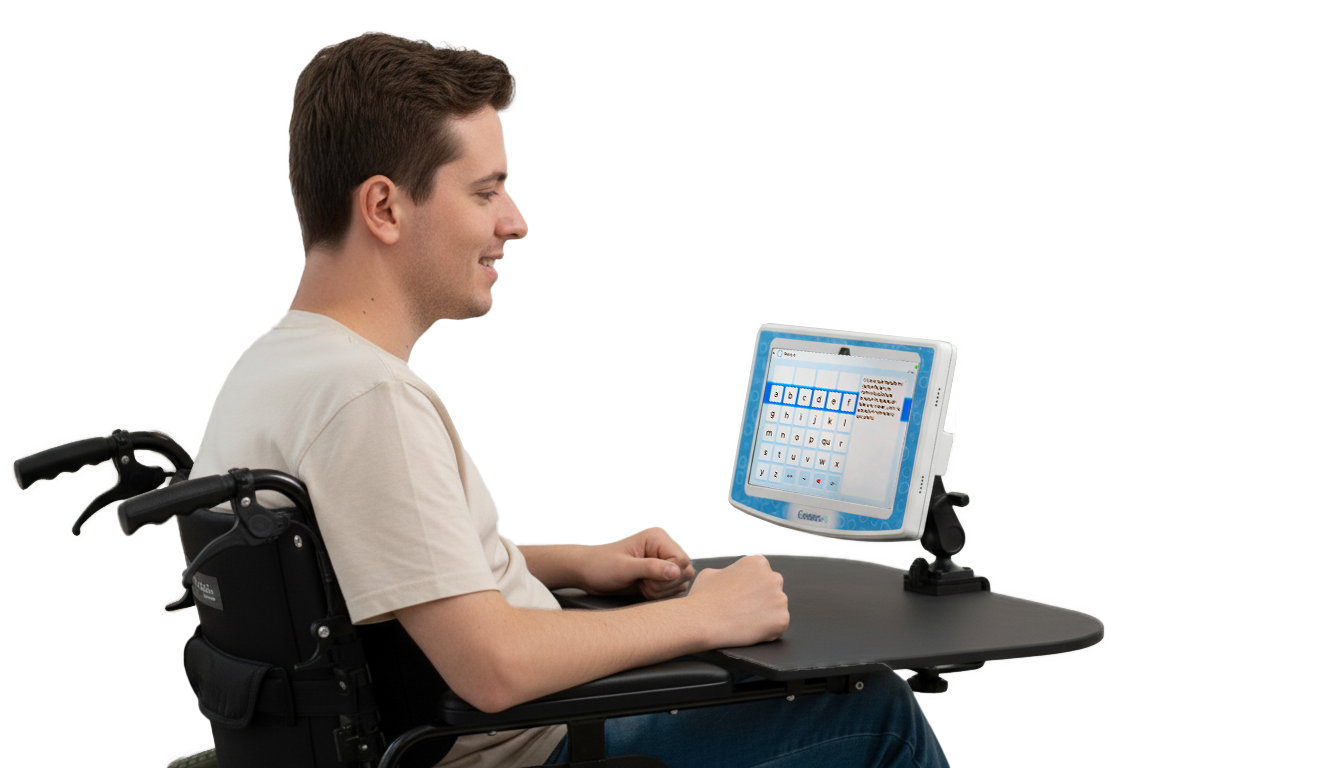
Webcam only
Speak with Your Eyes
No Special Hardware Needed
Revolutionary webcam-based eye-tracking technology that turns any laptop into a powerful text dictation tool
Free!
30s setup
No installation • Works in web browser • GDPR Compliant
Experience Eye Dictation Now
See how easy it is to control text with just your eyes
1
Click to start
2
Quick calibration
3
Start dictating
Why Choose Conversia Link Eye Dictation?
Webcam Only
Works with any laptop camera – no expensive hardware needed. Turn your existing device into a powerful accessibility tool.
Privacy First
Your video never leaves your device. All processing happens locally in your browser. GDPR compliant and completely private.
Instant Setup
Ready to use in under 30 seconds. No installation, configuration, or technical expertise required.
Empowering Expression Through Technology
Conversia Link turns any laptop into a voice-enabled tool — letting you dictate and speak using nothing but your eyes.
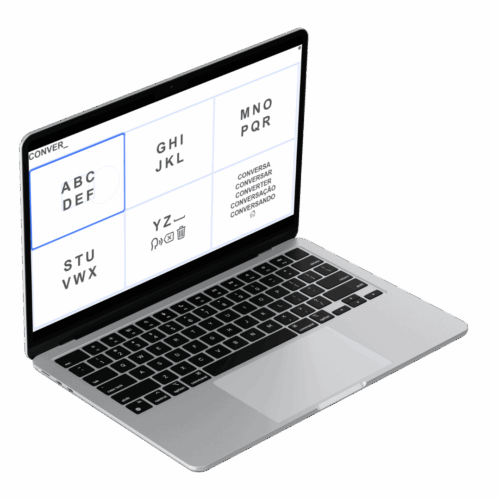
Advanced Features
Personalized Voice
AI-powered voice customization that adapts to your preferences and speaking style.
Multi-language Support
Support for 10+ languages and dialects with native pronunciation.
Smart Text Correction
Auto-correction and intelligent text suggestions for improved accuracy.
Fast Typing
Adjustable time offset settings to match your typing speed and comfort level for optimal performance.
Customize Your Interface
Personalize colors, layouts, and settings to create an interface that works perfectly for you.
Works in Web Browser
No downloads or installations required. Access Conversia Link instantly from any modern web browser.
Powered by 9 Years of Eye-tracking Expertise
Colibri has been pioneering webcam-based eye-tracking technology since 2017, with published research from leading institutions worldwide
1000000
Research Participants
20
Scientific Publications
8
Years of Innovation
Featured in Research From:
Stanford University
MIT
Harvard
Oxford
Cambridge
Berkeley
SWPS University
Clemson University
Conversia Link vs Traditional Hardware
| Feature | Conversia Link (Webcam) | Traditional Hardware |
| Cost | Free (or $25/month) | $2,000 – $10,000 |
| Setup Time | 30 seconds | Hours of installation |
| Portability | Any laptop or PC | Fixed setup required |
| Accuracy | Research-grade | Professional |
| Languages | 10+ | Limited selection |
| Maintenance | None required | Regular calibration |
Early Stage Product – Unlimited Access!
We're building something amazing and you get to be part of the journey from day one
No Limits Now
Currently unlimited usage while we perfect the technology and gather valuable user feedback
Future Pricing Plans
Soon available as Free tier and Premium ($25/month) with advanced features
Roadmap Collaboration
We’re eager to improve the tool and build it based on your feedback, so be part of our development journey
We ❤️ Your Feedback!
Help us build the perfect eye-tracking solution by sharing your experience and suggestions
Technical Specifications
System Requirements
- Operating System: Windows 10+, macOS 10.14+, Linux
- RAM: Minimum 4GB, Recommended 8GB+
- Camera: Built-in webcam or USB camera
- Processor: Modern dual-core CPU (2015+)
- Internet: Required for initial setup only
Browser Compatibility
- Chrome: Version 88+ (Recommended)
- Firefox: Version 85+
- Safari: Version 14.1+
- Edge: Version 88+
- Mobile: Mobile & tablet friendly
Performance
- Tracking Rate: 30 FPS real-time
- Calibration: 4-point, under 30 seconds
- Accuracy: Research-grade precision
- Latency: <100ms response time
- Privacy: All processing local (no data sent)
Frequently asked questions
How accurate is webcam eye-tracking?
Conversia Link achieves research-grade accuracy using advanced computer vision and machine learning. While traditional hardware offers slightly higher precision, our webcam solution provides more than sufficient accuracy for text dictation and accessibility applications.
What are the system requirements?
Conversia Link works on any modern computer with a webcam and updated browser. Minimum requirements include 4GB RAM, a dual-core processor from 2015 or newer, and Chrome 88+ or equivalent browser.
Is my privacy protected?
Absolutely. All eye-tracking processing happens locally in your browser. No video data or personal information is transmitted to our servers. Your privacy and security are our top priorities.
Can I use it offline?
After initial setup and model download, Conversia Link can work offline for basic functionality. However, some features like AI voice enhancement and cloud saving require an internet connection.
How does it compare to hardware solutions?
While hardware solutions offer maximum precision, Conversia Link provides 90% of the functionality at 1/10th the cost. For accessibility and general use, webcam-based tracking is more practical and accessible.
What languages are supported?
Conversia Link supports 10+ languages including English, Spanish, French, German, Italian, Portuguese, Russian, Chinese, Japanese, and many more. Voice synthesis is available for all supported languages.
Get in Touch
Interested in Conversia for your organization? Have questions about implementation or custom features?
Get early access to premium features and priority support.

 pela
pela 